
About Business Exports
Export a list of Business Locations, Generators or Company Locations that fall within a catchment.
The exported data includes the brand, location name, street address and distance from that site to your location. Any populated site details or confidential details fields will also be exported.
Running a Business Export
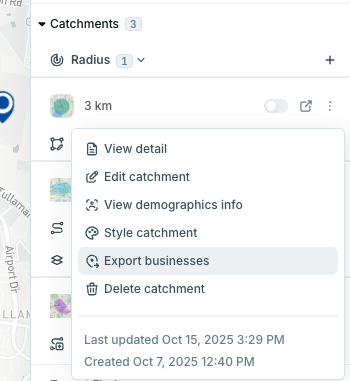
- Click on any pin in GapMaps and expand the 'catchments' section
- On any catchment, click the three dots and then ‘Export businesses’.
- Select the location listings you wish to include in your report. For best results, we recommend selecting one category at a time.
- Click ‘Export’
- The report will be emailed to you.
Note: The distance listed in the export is the direct distance of the location from your pin.